

Security Components
Patch Intelligence
Nanitor’s patch intelligence features help you keep track of pending security patches across your organization. Which assets are going unpatched, how many are overdue, how many patches have been installed in the last month - Nanitor gives a clear overview of the health of your organization’s patch habits and helps you strengthen your security posture.

What makes patching a vital element in contemporary cybersecurity?
One of the oldest security concepts, yet one of the most neglected, is patching. Every asset, platform, device, etc. that runs code needs to be patched at some point. The nature of operating systems and programs is that errors are made and not every possible security exploit can be designed and considered from the onset.
Therefore, patching operating systems, platforms, services, applications, etc. is required for every organization.
How does Nanitor redefine patching for you?
The issue most organizations face is the volume of patching. Nanitor solves this by prioritizing all patches, along with the priority of the asset where the patch needs to be applied. This combination will allow the security team to resolve the most important patches on the most important devices.
Key benefits
01
Prioritization in the Nanitor Diamond
Like other security issues, Nanitor will list missing patches on your assets as soon as they are detected, give them a priority rating, and show them in the Nanitor Diamond.
02
See assets that need patching
Easily view which assets are missing a particular patch in the patch detail view in a prioritized order, making it easy to identify the most critical assets that need patching.
03
Statistics on patch status
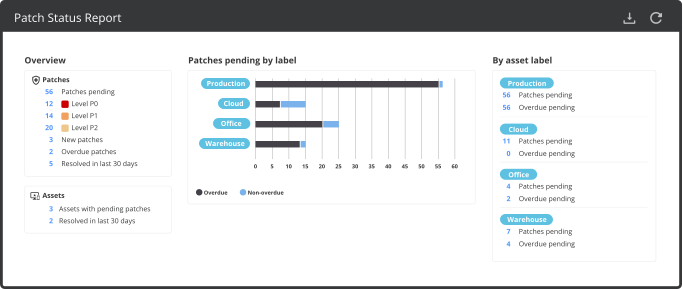
View statistics on patches in the patch status report - number of patches pending, new and overdue patches, how many at each priority level, and how many have been resolved (installed on all outstanding assets) in the past month.
04
Break down by asset label
The dynamic patch status report can be filtered or broken down by asset label, providing an easy overview of what kinds of assets in what departments need patching.
05
Reduce the attack surface
Ensuring that security configurations follow best practices helps create a strong first line of defense in order to reduce the blast radius in case a malicious user gains access to your systems.
06
Complete visibility
Nanitor’s intuitive user interface gives a comprehensive picture of current security configurations and, in combination with the Technical Policy component, makes it easy to create a risk reduction program.
07
Integrated use of industry best practices
Nanitor tracks the security posture of your systems and ensures that they follow your technical policy. When insecure configurations are detected, Nanitor will provide detailed information and prioritization along with remediation instructions.
08
Quick time-to-result
Installing the Nanitor server is quick, onboarding is simple and you can expect to get your first results within minutes following onboarding. Start improving your organization’s cybersecurity posture systematically within days.
Unpatched systems are vulnerable to known exploits and often easily compromised
Bugs and vulnerabilities are constantly being discovered and patched in the most widely used operating systems. If vital security patches are not installed within a reasonable timeframe, your organization is left open to hackers exploiting known vulnerabilities.
Ensuring that security patches are installed in a timely manner across your organization’s assets can be a difficult task, but it no less vital to the system’s overall security posture.

Aggregate statistics on patches
Nanitor’s Patch Status Report aggregates patch statistics across your organization’s assets, broken down overall and by asset labels, and can be further filtered to include only assets with certain labels. The flexible statistics overview allows you to compare departments or purposes by total outstanding patches or only overdue patches (>30 days old), consider only certain types of assets, or keep track of how quickly patch issues are resolved. All numbers can be clicked for further details.
Collecting your outstanding patches in one place
Nanitor’s Discovery Engine quickly detects when a patch is missing on an asset and checks it in to your central Nanitor instance. Each patch raises an issue, which is prioritized alongside other security issues in your system based on the importance of the issue and assets where it is present. The issue detail page shows the vendor’s information on the patch, what assets are missing this patch, and how critical those assets are, making it easy to tell which assets need patching first.

Schedule a demo today
Benefits include:
- Reduce the attack surface
- All your platforms in one place
- Comparison with best practices
- Quick time-to-result